
Cancel a subscription
Here’s how to cancel a subscription in the Parqio app.
Last updated 22 October 2026 · Checked for app 4.0.3
Before you begin
- You need an active subscription.
Open Settings → Subscriptions
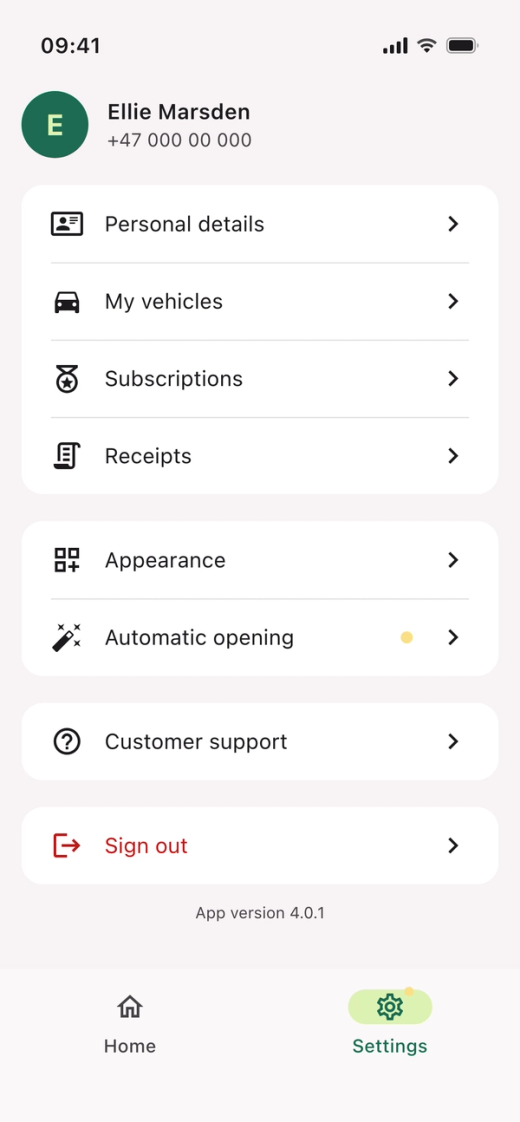
- Open the Parqio app.
- Tap “Settings” at the bottom right.
- Tap “Subscriptions”.
Open the subscription
- Tap the subscription you want to cancel. This opens “Your plan”.
Cancel the subscription
- Tap “Cancel subscription” at the bottom.
- Tap “Yes, Cancel It” to confirm.
In “Your plan”, you can also switch between paying monthly and yearly.
Did you find what you were looking for?
Didn’t find what you were looking for?Contact customer support