
How do I connect a license plate recognition camera?
How to connect a license plate recognition camera to the Parqiobox.
Last updated 26 October 2026
Before you begin
- Parqiobox
- HIKVISION camera
- POE adapter
- Ethernet cables
Drill a cable hole and mount the camera
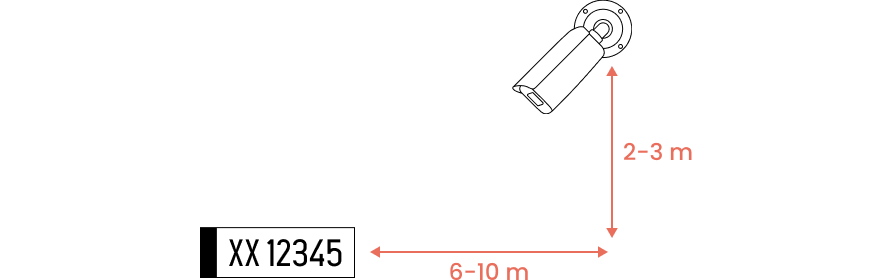
- Mount the camera 2–3 meters high, at an angle where the sun doesn’t shine straight into the lens. We don’t recommend mounting it lower, because car headlights can blind the camera.
- Recommended distance from the camera to the plate it reads: 4–12 meters (6–10 is ideal).
- Before you fix the camera in place, drill a hole through the garage wall for the cable. The hole must be big enough to pull an Ethernet cable through.
- Install the included mounting box so that its hole lines up exactly with the hole in the garage wall.
- Connect the Ethernet cable to the camera, and pull the cable through the hole in the garage wall.
- Screw the camera onto the mounting box.
Wiring
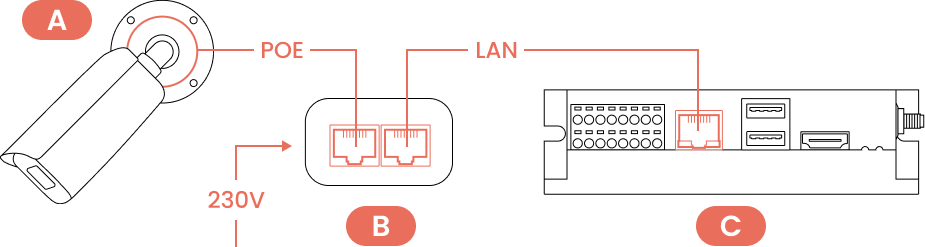
- Place the POE adapter (B) in the enclosure together with the Parqiobox (C).
- Connect the Ethernet cable from the camera (A) to the port marked “POE” on the adapter (B).
- Connect an Ethernet cable from the port marked “LAN” on the adapter (B) to the Ethernet port on the Parqiobox (C).
- Connect the POE adapter (B) to 230V.
Check the camera angle
Call Parqio customer support at +47 23 50 69 89 and choose option 3 (installation), or chat with us, to check whether the camera angle is optimal.
Did you find what you were looking for?
Didn’t find what you were looking for?Contact customer support