
Change payment information
Here’s how to change your payment information in the Parqio app.
Last updated 23 October 2026 · Checked for app 4.0.3
Before you begin
- You need an active subscription.
Open Settings → Subscriptions
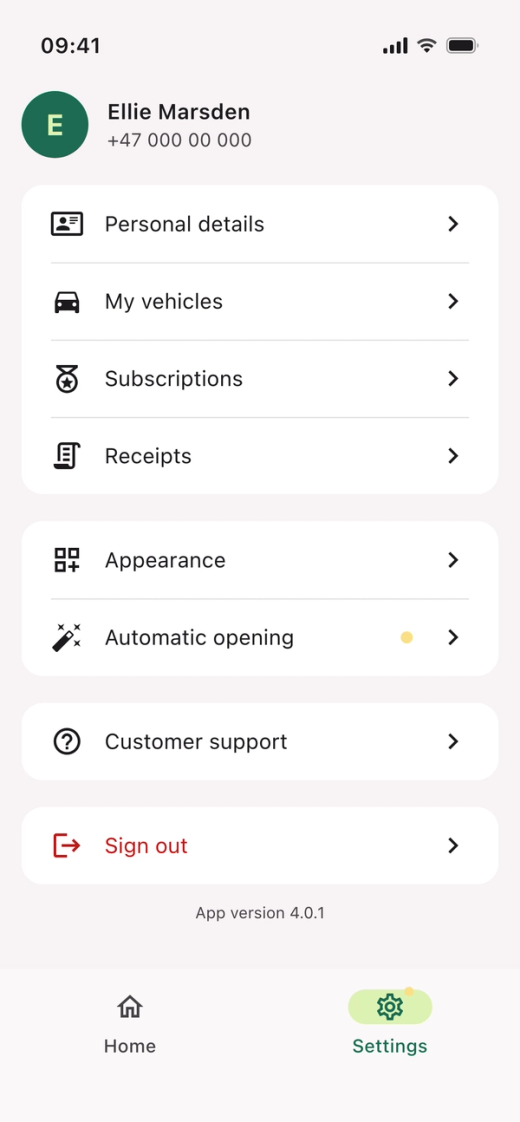
- Open the Parqio app.
- Tap “Settings” at the bottom right.
- Tap “Subscriptions”.
Open Payment method
- Tap “Payment method”.
Choose a payment method
- Under “Your payment methods”, choose a saved card and tap “Save”.
- To add a new card, tap “New payment method”.
Add a new payment method
- Choose Apple Pay, Google Pay or a saved card, or choose “New card” to enter the card number, expiry date and CVC (the three digits on the back of the card).
- Tap “Set up”.
After you add a new payment card, your subscription is only reactivated once a charge to the new card has been attempted. In some cases, this can take a few days. In the meantime, you can open the gate with the Parqio app or by calling +47 23 50 68 88.
Did you find what you were looking for?
Didn’t find what you were looking for?Contact customer support